
Columbia Utilities: Pay Bill, MyMeter Login, Phone Number, Outage and Service Help
Need to pay a City of Columbia utility bill, open MyMeter, manage AutoPay, start service or call customer service? This guide gives the official route and the details to keep ready before you click.
Columbia Utilities covers electricity, water, sewer, trash and recycling, stormwater and other utility needs. Use the right path below for billing, outages, boil advisories, service changes and high-bill help.
Choose Your Columbia Utilities Task First
Start with the action you need. This avoids the common mistake of using the payment portal for a service request, or the outage number for a billing problem.
Official Columbia Utilities Login, Pay Bill and MyMeter Portal
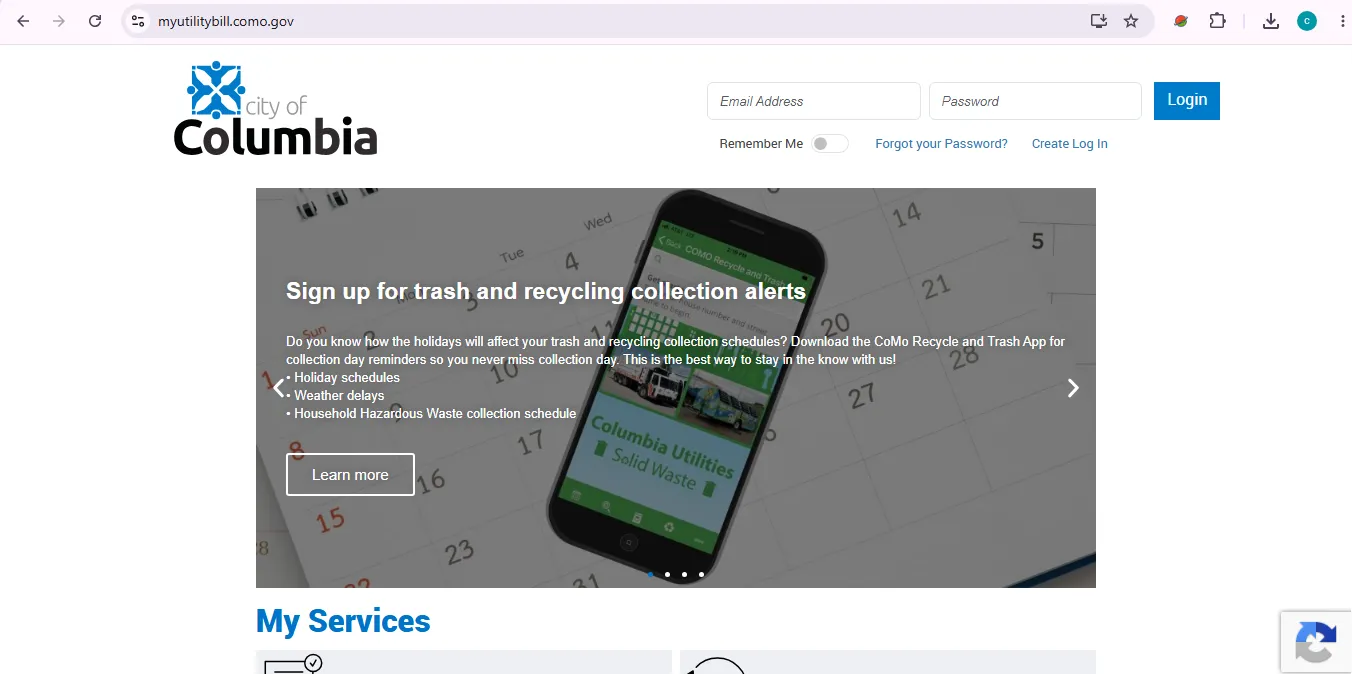
The MyMeter portal is the best visual starting point for this article because it connects login, account creation, Pay Bill, AutoPay, service requests, rebates and outage map actions.
City of Columbia Utilities Phone Numbers and Office Details
Use the right number for the right issue. A bill question, outage, water main break, sewer backup and general City question should not be handled the same way.
MyMeter Login, Create Log In, Forgot Password and Account Features
MyMeter helps with more than one-time payment. It can show bill and payment history, current charges, payment arrangements, usage charts, account markers and energy goals.
| MyMeter action | What it asks or shows | What to do next |
|---|---|---|
| Login | City of Columbia login with Remember Me and Forgot Password. | Use only on a personal device if saving User ID. |
| Create Log In | Name on Account, Account Number, Email, Password, Secret Question/Answer and Bill Delivery choice. | Use details exactly as they appear on your utility account. |
| Pay Bill | Links to payment processing through the official payment route. | Save confirmation after payment. |
| Manage Auto Pay | AutoPay management through PayCoMo after linking your utility account. | Check upcoming draw date and notification settings. |
| Usage charts | Detailed usage or summary charts by service or account. | Use this before calling about a high bill. |
How to Pay City of Columbia Utilities Bill Online or by Phone
City of Columbia lists online payment through PayCoMo or MyUtilityBill/MyMeter, and a 24/7 automated phone system for one-time card payments.
- Open the official payment route.
Use PayCoMo or the MyMeter portal from official City pages. - Keep the bill nearby.
You may need the City of Columbia utility customer number and account number from your utility bill. - For phone payment, call the automated system.
Call 573-874-7694, enter the customer number followed by the pound key, then enter the account number followed by the pound key. - Verify the account information.
Confirm the system shows the correct account before finishing payment. - Save payment proof.
Keep the confirmation number, receipt or email until the payment appears on the account.
Columbia Utilities Payment Options Compared
Online payment is not the only route. Choose the payment method based on urgency, access and whether you need a receipt or cashier help.
| Payment option | Best for | Important detail |
|---|---|---|
| Online through PayCoMo or MyMeter | Fast self-service payment and account access. | Use official links only and save confirmation. |
| Phone payment | 24/7 one-time card payment. | Call 573-874-7694 with customer and account number ready. |
| Non-urgent check or money order payment. | Do not mail cash. Standard mail goes to City of Columbia, ATTN: Finance Department, P.O. Box 1676, Columbia, MO 65205. | |
| Walk-in at City Hall | Customers who need cashier help or receipt. | City Hall is at 701 E. Broadway; lobby is listed as open 8 a.m. to 5 p.m. Monday to Friday. |
| Drive-thru | Vehicle-based payment without full lobby visit. | Drive-thru windows are on the north side of City Hall; have bill or account number ready. |
| Drop box | After-hours physical payment drop-off. | Use the secured orange drop-off collection box and clearly note the account. |
| Community partner locations | Gerbes or Walmart payment location users. | Bring the utility bill and biller ZIP code 652051676; allow up to 3 business days for posting. |
AutoPay and Budget Billing: What to Know Before Enrolling
AutoPay helps avoid missed payments. Budget Billing helps eligible customers pay the same amount each month instead of being surprised by high seasonal bills.
Start, Stop or Transfer City of Columbia Utility Service
Service requests should be submitted at least one business day in advance when possible. Same-day service requests may have a same-day service fee.
Residential deposits and setup fees listed by the City
| Item | Listed amount | Practical note |
|---|---|---|
| Electric deposit | $75 | Applies when electric service deposit is required. |
| Water deposit | $25 | Applies when water service deposit is required. |
| Sewer deposit | $45 | Applies when sewer service deposit is required. |
| Solid waste collection deposit | $20 | Applies when solid waste service deposit is required. |
| New account service fee | $15 | Listed setup fee for a new account. |
| Same-day connection fee | $15 | May apply to same-day connection requests. |
Start, transfer and stop checklist
- Submit beginning service request online or visit the office at 701 E. Broadway.
- Request new service at least one business day ahead when possible.
- For transfers, contact Utility Customer Service at least one day before utilities need to be transferred.
- For stopping service, provide a forwarding address.
- Same-day stop requests may be moved to the next business day.
- Deposits may be applied to the final bill, and remaining amounts may be sent to the customer.
- Natural gas is not handled through Columbia Utilities; the City points customers to Ameren Missouri for natural gas service.
Electric Outage, Water Main Break and Sewer Backup Help
For emergencies, call the correct number first. Online account tools are useful, but they should not delay urgent outage or utility emergency reporting.
- Call during an outage.
Columbia Water & Light encourages customers to call during an outage so crews can locate the problem quickly. - Give detailed information.
Report whether your whole area, only your home, a specific line, transformer or nearby street is affected. - Use the outage map.
Check whether the outage has already been reported through the official outage map. - Keep phone number updated.
The City says having the correct phone number on file helps outage reporting and follow-up calls.
Boil Advisory, Boil Order and Water Safety Steps
A boil advisory is a precaution after pressure drops, often from a water main break. A boil order is issued when known water-supply problems require customers to boil water for safety.
| Situation | What it means | What to do |
|---|---|---|
| Boil advisory | Precaution after pressure drops; water tests take time to process. | Boil water for three minutes before cooking or drinking. |
| Boil order | Known water supply problem; minimum duration can be longer for testing. | Follow official instructions until the order is lifted. |
| Ice maker | Automatic ice can contain unboiled water. | Do not consume ice from an automatic ice maker; remake ice with boiled water. |
| Dishes and food surfaces | Surfaces may need disinfecting during advisory/order. | Use clean tap water with unscented bleach per City instructions for food-contact surfaces. |
High Columbia Utility Bill, Leak Check and Energy Help
A high bill is easier to solve when you separate water usage, electric usage, sewer, trash and stormwater charges. MyMeter usage charts and customer service can help you narrow the problem.
| Issue | What to check first | Official next step |
|---|---|---|
| High water usage | Toilet flapper, tank fill valve, faucet leak, pipe leak, softener and water heater. | Contact Utility Customer Service; the City says a leak check request may be sent to the Water Utility. |
| High electric usage | Air conditioning, heating, weather, appliance use, old equipment and usage charts. | Customer Service may request a meter reread when electricity usage is questioned. |
| Seasonal bill swings | Summer cooling, winter heating, sewer/trash/stormwater charges and service changes. | Review Budget Billing eligibility if you want a steadier monthly amount. |
| Rental property estimate | Average utility consumption for the location before signing lease. | Contact Utility Customer Service; the City notes personal account information is not given to unauthorized people. |
Due Date, Past Due Notices and Disconnection Fees
Do not wait until the account reaches disconnection status. The City gives specific timing and fee guidance for past-due accounts.
| Billing issue | City guidance | User action |
|---|---|---|
| Due date | Utility bill is due 20 days from the billing date. | Pay before the 20-day grace period ends. |
| Late payment | If not paid within the 20-day grace period, account is charged 3% of the delinquent balance. | Call Customer Service before the account gets worse. |
| Past due notice | Past due notice is mailed if not paid within 23 days from billing date, then 5 business days are given before disconnection risk. | Do not ignore the notice; ask about arrangements or assistance quickly. |
| Residential non-payment dispatch | $30 non-payment fee may apply when a worker is dispatched to disconnect for nonpayment. | Contact Customer Service before shutoff list action. |
| After-hours reconnect | $60 after-hours reconnect fee for residential water/electric reconnection outside normal business hours. | Ask Customer Service exactly what must be paid before reconnection. |
Roll Cart, Trash, Recycling and Utility Service Extras
Columbia Utilities includes more than bill pay and electricity. MyMeter links to Roll Cart Change Request, donations, efficiency programs, rebates and outage map options.
Common Columbia Utilities Mistakes to Avoid
These mistakes cause most payment, login and service delays.
- Do not copy payment links from unofficial emails, ads or random third-party pages.
- Do not use MyMeter Remember Me on a public computer.
- Do not call the outage number for routine billing questions.
- Do not wait until after disconnection if you already know payment will be late.
- Do not mail cash payments.
- Do not use partner locations for last-minute payment if service is already at risk; posting can take up to 3 business days.
- Do not assume AutoPay changes take effect immediately; the City says stop/change requests can take up to 3 days.
- Do not request weekend new-service connection; the City says new service connections are not performed after hours or weekends.
City of Columbia Utility Customer Service Map
Use the map for navigation only. For account-specific help, call Utility Customer Service or use MyMeter.
Map is for general navigation help. Always confirm current office access, hours and service rules on the official City of Columbia website before visiting.
Columbia Utilities FAQs
How do I pay my City of Columbia Utilities bill online?
Use the official CoMo Utilities MyMeter portal or the PayCoMo payment website. MyMeter includes a Pay Bill option, and the City billing page also links customers to pay.como.gov.
Where is the Columbia Utilities MyMeter login?
The official MyMeter login is at myutilitybill.como.gov. The portal shows City of Columbia login, Remember Me, Forgot Password and Create Log In options.
What is the City of Columbia Utilities customer service phone number?
Utility Customer Service can be reached at 573-874-7380 for billing, payment, account opening, transfer, closing, Budget Billing, high bill questions and general customer service help.
Can I pay a Columbia utility bill by phone?
Yes. The City lists a 24/7 automated phone payment system at 573-874-7694. You need your City of Columbia utility customer number and account number from your bill.
What is the Columbia Utilities electric outage number?
For electric outages, Columbia Water & Light lists the 24-hour emergency number 573-875-2555. The same number is also listed for water main breaks.
How do I report a sewer backup in Columbia, Missouri?
The City of Columbia Utilities page lists 573-441-5530 for sewer backup reporting.
How do I start, stop or transfer City of Columbia utility service?
Use the MyMeter Start New Services or Stop/Transfer Services route, contact Utility Customer Service at 573-874-7380, or visit the office at 701 E. Broadway. Requests should generally be submitted at least one business day in advance.
What deposits or fees may apply when starting Columbia utility service?
The City lists residential deposits of $75 electric, $25 water, $45 sewer and $20 solid waste collection, plus a $15 service fee to set up a new account and a $15 same-day connection fee when applicable.
What should I do if my Columbia utility bill seems too high?
Contact Utility Customer Service at 573-874-7380 or UCS@CoMo.gov. The City says high water usage may trigger a leak check request, and electric usage questions may lead to a meter reread.
What should I do during a Columbia boil advisory or boil order?
The City says water should be boiled for three minutes before cooking or drinking. Do not use ice from an automatic ice maker, and remake ice with water boiled for three minutes.
Official Source Note
This independent guide summarizes official City of Columbia, CoMo Utilities, MyMeter and PayCoMo pages to help customers reach the right action faster. It cannot accept payments, access accounts, reconnect service, change AutoPay, approve payment arrangements, report outages or verify your account.
| Official source | Used for |
|---|---|
| CoMo Utilities MyMeter Portal | Login, Create Log In, Forgot Password, Pay Bill, Manage Auto Pay, Start New Services, Stop/Transfer Services, usage charts, account management and outage map access. |
| PayCoMo | Official City of Columbia payment route for online payments. |
| Utility Customer Service – Billing & Payments | Customer service phone, email, payment options, AutoPay, Budget Billing, start/stop/transfer service, deposits, fees, due date, high-bill help and assistance routes. |
| City of Columbia Utilities | Utility service categories, emergency reporting numbers, outage and utility department details. |
| Outage Map & Power Restoration | Electric outage number, outage map guidance, phone-number update advice, restoration expectations and medical equipment warning. |
| Boil Advisories and Boil Orders | Boil advisory, boil order, boil-water steps, notification procedure and water emergency contact information. |
| Water Leaks | Toilet, faucet, water pipe, softener and water heater leak checks for high water usage. |
Last checked: July 10, 2026. Official page layouts, phone routing, fees, deposits, payment options, program rules and emergency instructions can change. Always follow the latest official instructions after clicking.