
Columbus Utilities: Pay Bill, Customer Portal Login, Phone Number, Outage and Water Help
Need to pay a Columbus Water & Power bill, sign in to the customer portal, use Pay Now, call customer service, start service or report an outage? This guide gives the official route and the exact details to keep ready.
Columbus utility tasks can involve water, sewer, power, payment assistance, water main breaks and after-hours emergencies. Use the correct official page or phone number below before entering payment or account details.
Choose Your Columbus Utility Task First
Start with the task, then use the official page. This avoids sending every user to one generic login page.
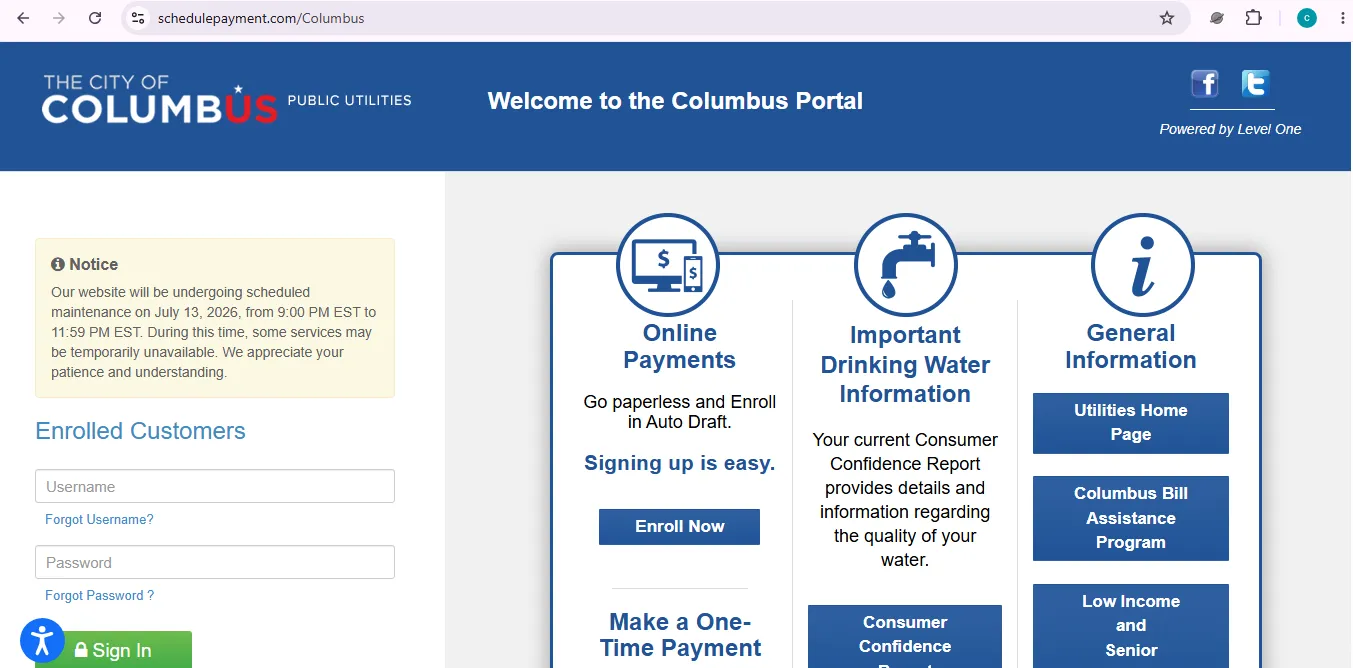
Official Columbus Customer Portal: Login, Pay Now, Auto Draft and Paperless Billing
The Columbus customer portal is the best place to start for online bill payment. It includes enrolled customer sign in, forgot username, forgot password, Enroll Now and one-time Pay Now.
Columbus Utilities Phone Numbers, Office, Email and Emergency Contacts
Use the right number. A payment question, turn-off notice, water main break, sewer emergency and power outage are different tasks.
How to Pay Columbus Water & Power Utility Bill Online
Use the official Columbus customer portal for online payment. The portal gives separate paths for enrolled customers and one-time payment users.
- Open the official Columbus customer portal.
Click Columbus Customer Portal. - Choose the correct action.
Use Sign In if you are enrolled, Enroll Now for paperless billing or Auto Draft, or Pay Now for a one-time payment without login. - Keep the bill in front of you.
Use the account details exactly as shown on the utility bill. - Check amount and payment method.
Confirm the payment amount, account details and card or bank information before submitting. - Save payment proof.
Save the confirmation, receipt, email or screenshot on your personal device. - Call if service is at risk.
If you received a turn-off notice, door tag or service termination, call 614-645-8276.
Columbus Utility Bill Payment Options Compared
Online payment is not the only option. Choose the payment method based on urgency and whether your service is already at risk.
| Payment option | Best for | What to check before using |
|---|---|---|
| Customer portal login | Enrolled customers who want bill access, paperless billing or Auto Draft. | Use official portal Sign In or recovery links only. |
| Pay Now | One-time payment without logging in. | Keep bill/account details ready before clicking Pay Now. |
| Pay by phone | Card payment by phone. | Call 833-735-2762 and keep the bill ready. |
| Mail payment | Non-urgent check payment. | Mail early and make check payable to Columbus City Treasurer. |
| Walk-in payment office | In-person payment or account help during office hours. | Office is listed at 111 N. Front Street with weekday hours. |
| Other payment locations | Retail payment access such as Western Union locations. | Contracted vendor locations may charge a convenience fee. |
Turn-off Notice, Door Tag or Terminated Service: What to Do
If your account has a turn-off notice, door tag or service termination, do not rely only on online payment confirmation. The City payment page says you must call customer service to restore or prevent termination of service.
- Pay through the official route if payment is due.
Use the customer portal, Pay Now, pay by phone or another official payment method. - Save payment confirmation.
Write down the confirmation number, amount, date and payment method. - Call Customer Service.
Call 614-645-8276 and explain that you received a turn-off notice, door tag or service termination. - Ask what happens next.
Confirm whether reconnection, arrangement, proof of payment or additional action is required.
Start New Columbus Utility Service: Water, Sewer or Power
Start-service rules depend on whether you are a property owner, tenant, power customer, water customer or sewer customer.
Before calling or applying, keep ready
- Service address and property type.
- Move-in or service start date.
- Owner, tenant or business name.
- Account holder contact details.
- Lease, tenant billing agreement or ownership information if applicable.
- Meter access details if a reading is needed.
- Power service-area confirmation if requesting Division of Power electric service.
Columbus Power Outage Map and After-hours Power Emergency
The Division of Power outage map shows service territory boundaries, outage location and cause, affected customers and estimated restoration time. If your outage is already shown, the City says DOP is working to restore service and there is no need to call just to report the known outage.
- Open the power outage map.
Click Columbus Power Outage Map. - Check whether your outage is already listed.
Look for outage location, cause, affected customers and estimated restoration time. - Report it only if not shown.
If you are a Division of Power customer and your outage is not shown, use the map reporting option. - Use emergency contact after hours.
For power outages or downed wires after hours, call 614-645-7627.
Report a Water Main Break, Spraying Water or Ponding Water
If water is spraying out or ponding in a yard or street during no rain or melting snow, the City says it may be a water break and should be reported immediately.
| Water issue | Who to contact | What to say |
|---|---|---|
| Suspected water main break during weekday hours | 311 / 614-645-3111 or 614-645-8276 | Give the nearest address, intersection, water direction and whether water is spraying or ponding. |
| After-hours or weekend water break | 614-645-7788 | Explain that it appears to be a water main break and give exact location details. |
| Discolored water after repair | Customer Service if it does not clear | Mention repair area and how long cold water has been running. |
| Possible boil water advisory | Check Utilities home page or call Customer Service | Ask whether your address is included in an advisory. |
Columbus Utility Bill Assistance, Discounts and Payment Arrangements
The City lists income-based discount programs, payment arrangements and emergency funding references for customers having difficulty paying utility bills.
| Help type | Who it may help | Action step |
|---|---|---|
| Income-based discount programs | Some HEAP, Medicaid, SNAP and public housing participants. | Open utility bill assistance page. |
| Senior programs | Seniors age 60 and older with limited income. | Check the discount page and prepare proof of eligibility. |
| Payment arrangements | Customers who cannot pay the full bill immediately. | Use the payment arrangement route before the account reaches emergency status. |
| Emergency funding | Customers with temporary utility-payment difficulty. | Review listed agencies and prepare income/account documents. |
High Columbus Utility Bill: Practical Checks Before Calling
A high utility bill is easier to resolve when you identify the likely cause before calling. Review water use, leaks, power use and billing changes.
| Bill concern | What to check first | Who to contact |
|---|---|---|
| Water bill jumped | Toilets, outdoor faucets, irrigation, hidden leaks and recent meter changes. | Customer Service at 614-645-8276. |
| Power bill high | Heating/cooling use, thermostat, old appliances and seasonal demand. | Customer Service or Division of Power resources. |
| Sewer charge question | Water usage, outdoor watering and whether auxiliary metering applies. | Customer Service or sewer service resources. |
| New meter or changed reading | Compare recent usage and look for leaks after meter upgrades. | Customer Service or email utilityleadrep@columbus.gov. |
Columbus Water & Power Walk-in Payment Office Map
Use the map for navigation only. For account-specific help, use the customer portal or call Customer Service.
Map is for general navigation help. Always confirm current office access, hours and payment rules on the official City of Columbus website before visiting.
Columbus Utilities FAQs
How do I pay my Columbus utility bill online?
Use the official Columbus customer portal. Enrolled customers can sign in, and users who do not want to log in can use Pay Now for a one-time payment.
Where is the Columbus Water & Power customer portal login?
The customer portal is linked from the official Columbus Water & Power page under Payment / Customer Portal. It includes Sign In, Forgot Username, Forgot Password, Enroll Now and Pay Now.
Can I pay Columbus utilities without logging in?
Yes. The Columbus portal has a Pay Now option for one-time payment without logging in or enrolling first.
What is the Columbus utilities customer service phone number?
Columbus Water & Power Customer Service is listed as 614-645-8276 on weekdays from 7:00 a.m. to 6:00 p.m.
What is the Columbus utilities pay by phone number?
The City of Columbus utility bill payment page lists pay by phone at 833-735-2762 for Visa, Discover, MasterCard and American Express payments.
Where can I pay a Columbus utility bill in person?
The walk-in payment office is listed at 111 N. Front Street, Columbus, Ohio 43215, weekdays from 7:30 a.m. to 4:30 p.m., with an after-hours drop box available.
What should I do if I received a turn-off notice or door tag?
If you received a turn-off notice postcard, door tag for nonpayment, or service has been terminated, call 614-645-8276 to restore or prevent termination of service.
How do I report a Columbus power outage?
Use the Columbus Power Outage Map if the outage is not already shown. For after-hours power emergencies, the City lists 614-645-7627.
How do I report a Columbus water main break?
Report suspected water main breaks to 311 or 614-645-3111, or call 614-645-8276 during weekdays. After hours and weekends, call 614-645-7788.
Does Columbus offer utility bill assistance?
Yes. The City lists income-based discount programs, payment arrangements and emergency funding references for eligible customers, including some HEAP, Medicaid, SNAP, public housing and senior applicants.
Official Source Note
This independent guide summarizes official City of Columbus Water & Power pages and the official Columbus customer portal to help customers reach the right action faster. It cannot accept payments, access accounts, prevent termination, restore service, report outages, submit service requests or change billing settings for you.
| Official source | Used for |
|---|---|
| Columbus Water & Power | Main utility page, payment portal, contact details, customer service, walk-in office, emergency utility numbers and most-requested links. |
| Columbus Customer Portal | Sign In, Forgot Username, Forgot Password, Enroll Now, paperless billing, Auto Draft and Pay Now one-time payment. |
| Utility Bill Payment Locations | Pay by phone, mail address, walk-in payment office, retail payment locations and turn-off notice guidance. |
| Start New Utility Service | Property owner service setup, tenant billing agreement, Division of Power service-area guidance, water service eligibility and sewer service contact routing. |
| Power Outage Map | Outage map, affected customers, restoration estimate, reporting outages not shown and after-hours power emergency contact. |
| Report a Water Main Break | Water main break signs, reporting numbers, after-hours water maintenance, boil advisory note and discolored water after repair guidance. |
| Assistance with Utility Bills | Income-based discounts, payment arrangements, emergency funding references and eligible assistance categories. |
Last checked: July 10, 2026. Official page layouts, portal notices, phone routing, payment methods, service rules, outage information and assistance programs can change. Always follow the latest official instructions after clicking.